When populating the solr schema in Sitecore, the managed schema for solr is built. In it you can find a reference to the synomyms.txt file. But it’s just that one file which is located in the conf-folder in the core, but not in conf/lang – so it is not language based.
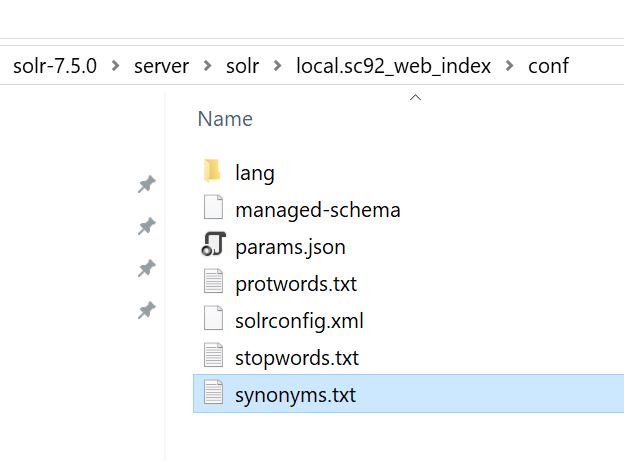
For retrievieving the synonyms language based we extended the Sitecore logic and decided to do it in a similar way like Sitecore does.
We wrote our own PopulateFields Processor and patched it after Sitecore’s one.
<pipelines>
  <contentSearch.PopulateSolrSchema>
	<!-- Processor for additional SOLR schema -->
	<processor type="Foundation.ContentSearch.Pipelines.ContentSearchPopulateSolrSchema.CustomPopulateFields, Foundation.ContentSearch"
			   patch:after="processor[@type='Sitecore.ContentSearch.SolrProvider.Pipelines.PopulateSolrSchema.PopulateFields, Sitecore.ContentSearch.SolrProvider']"/>
  </contentSearch.PopulateSolrSchema>
</pipelines>
In this processor we overwrote the Process- and GetHelper-method to return our custom SchemaPopulateHelper, which is related to the passed index in the arguments.
public override void Process(PopulateManagedSchemaArgs args)
{
   this._indexName = args.Index.Name;
   base.Process(args);
 }
protected override ISchemaPopulateHelper GetHelper(SolrSchema schema)
{
Assert.ArgumentNotNull(schema, "schema");
return new CustomSchemaPopulateHelper(schema, this._indexName);
}In our CustomSchemaPopulateHelper we get all fields we wrote into our config and add them to the schema. (You will find the code of the helper at the end of the post).
The config looks like:
<customSolrManagedSchema>
	<commands applyToIndex="sitecore_master_index|sitecore_web_index">
	  <!-- Can only be successful if the referenced files (ex. synonyms_de.txt) exists in the solr folder -->
	  <Type>
		<name>text_en</name>
		<class>solr.TextField</class>
		<positionIncrementGap>100</positionIncrementGap>
		<indexAnalyzer>
		  <tokenizer>
			<class>solr.StandardTokenizerFactory</class>
		  </tokenizer>
		  <filters>
			<class>solr.StopFilterFactory</class>
			<words>lang/stopwords_en.txt</words>
			<ignoreCase>true</ignoreCase>
		  </filters>
		  <filters>
			<class>solr.LowerCaseFilterFactory</class>
		  </filters>
		  <filters>
			<class>solr.EnglishPossessiveFilterFactory</class>
		  </filters>
		  <filters>
			<class>solr.KeywordMarkerFilterFactory</class>
			<protected>protwords.txt</protected>
		  </filters>
		  <filters>
			<class>solr.PorterStemFilterFactory</class>
		  </filters>
		</indexAnalyzer>
		<queryAnalyzer>
		  <tokenizer>
			<class>solr.StandardTokenizerFactory</class>
		  </tokenizer>
		  <filters>
			<class>solr.SynonymGraphFilterFactory</class>
			<expand>true</expand>
			<ignoreCase>true</ignoreCase>
			<synonyms>lang/synonyms_en.txt</synonyms>
		  </filters>
		  <filters>
			<class>solr.StopFilterFactory</class>
			<words>lang/stopwords_en.txt</words>
			<ignoreCase>true</ignoreCase>
		  </filters>
		  <filters>
			<class>solr.LowerCaseFilterFactory</class>
		  </filters>
		  <filters>
			<class>solr.EnglishPossessiveFilterFactory</class>
		  </filters>
		  <filters>
			<class>solr.KeywordMarkerFilterFactory</class>
			<protected>protwords.txt</protected>
		  </filters>
		  <filters>
			<class>solr.PorterStemFilterFactory</class>
		  </filters>
		</queryAnalyzer>
	  </Type>
	</commands>
</customSolrManagedSchema>
As you can see we built the part for the Type from managed schema which is created when populating the schema from Sitecore and added the filter for the synonyms.
lang/synonyms_de.txtBy default it would be something like:
synonyms.txtWe added this for every text_xx type we need it for. Now, after populating the schema, the synonyms from our langugage based files are used.
If you have any other ideas how to do this, let me know. Otherwise I hope this will help you for getting the right synonyms in the right language.
Here’s the the whole CustomPopulateSchemaHelper class:
namespace Foundation.ContentSearch.Helper
{
    using System;
    using System.Collections.Generic;
    using System.Linq;
    using System.Linq.Expressions;
    using System.Xml;
    using System.Xml.Linq;
    using NLog;
    using Sitecore.Configuration;
    using Sitecore.ContentSearch.Linq.Utilities;
    using Sitecore.ContentSearch.SolrProvider.Pipelines.PopulateSolrSchema;
    using Sitecore.Xml;
    using SolrNet.Schema;

    /// <summary>
    /// Represents a custom schema populate helper to fill the
    /// managed schema with custom fields and types.
    /// </summary>
    public class CustomSchemaPopulateHelper : ISchemaPopulateHelper
    {
        #region Private Static Fields

        /// <summary>
        /// Saves the <see cref="Logger" /> instance for the current class.
        /// </summary>
        private static readonly Logger _logger = LogManager.GetCurrentClassLogger();

        #endregion

        #region Private ReadOnly Fields

        /// <summary>
        /// Holds the solr schema.
        /// </summary>
        private readonly SolrSchema _solrSchema;

        /// <summary>
        /// Holds the index name.
        /// </summary>
        private readonly string _indexName;

        #endregion

        #region Private Fields

        /// <summary>
        /// Holds the current created custom created types.
        /// </summary>
        private List<string> _customTypes;

        #endregion

        #region Public Constructors

        /// <summary>
        /// Initializes a new instance of the
        /// <see cref="CustomSchemaPopulateHelper"/> class.
        /// </summary>
        /// <param name="solrSchema">
        /// The solr schema.
        /// </param>
        /// <param name="indexName">
        /// The index name.
        /// </param>
        public CustomSchemaPopulateHelper(
            SolrSchema solrSchema, string indexName)
        {
            this._solrSchema = solrSchema;
            this._indexName = indexName;
            this._customTypes = new List<string>();
        }

        #endregion

        #region Public Enums

        /// <summary>
        /// Represents the available config node types in the config xml.
        /// </summary>
        public enum ConfigNodeType
        {
            Type = 0,
            Field = 1,
            DynamicField = 2
        }

        /// <summary>
        /// Represents the available operations for the solr schema.
        /// </summary>
        public enum Operation
        {
            Add,
            Replace,
            Delete
        }

        #endregion

        #region Public Methods

        /// <summary>
        /// Gets all fields (field and dynamic fields)
        /// </summary>
        /// <returns>
        /// Returns all fields.
        /// </returns>
        public IEnumerable<XElement> GetAllFields()
        {
            IEnumerable<XElement> entries =
                this.LoadElementsByConfigNodeTypes(
                    ConfigNodeType.Field, ConfigNodeType.DynamicField);

            return entries;
        }

        /// <summary>
        /// Gets all field types.
        /// </summary>
        /// <returns>
        /// Returns all field types.
        /// </returns>
        public IEnumerable<XElement> GetAllFieldTypes()
        {
            IEnumerable<XElement> entries =
                this.LoadElementsByConfigNodeTypes(ConfigNodeType.Type);

            this._customTypes.AddRange(
                entries.Select(x => this.GetNameValue(x)));

            return entries;
        }

        #endregion

        #region Private Methods

        /// <summary>
        /// Loads the elements by specific config node types.
        /// </summary>
        /// <param name="nodeTypes"></param>
        /// <returns></returns>
        private IEnumerable<XElement> LoadElementsByConfigNodeTypes(
            params ConfigNodeType[] nodeTypes)
        {
            Expression<Func<XmlNode, bool>> exp =
                PredicateBuilder.False<XmlNode>();

            foreach (ConfigNodeType item in nodeTypes)
            {
                string nodeType = item.ToString().ToLower();

                exp = exp.Or(x => x.Name.ToLower() == nodeType);
            }

            return this.LoadElements(exp).Select(x => x.Value);
        }

        /// <summary>
        /// Loads the specific elements from the xml config.
        /// </summary>
        /// <param name="predicate">
        /// Predicate to filter the elements.
        /// </param>
        /// <returns>
        /// Returns the specific elements.
        /// </returns>
        private List<KeyValuePair<ConfigNodeType, XElement>> LoadElements(
            Expression<Func<XmlNode, bool>> predicate)
        {
            List<KeyValuePair<ConfigNodeType, XElement>> elements =
                new List<KeyValuePair<ConfigNodeType, XElement>>();

            XmlNodeList commands = Factory.GetConfigNodes(
                "contentSearch/customSolrManagedSchema/commands");

            foreach (XmlNode command in commands)
            {
                if (!this.IsApplicable(command, this._indexName))
                {
                    CustomSchemaPopulateHelper._logger.Debug(
                        "Skipping command with applyToIndex '{0}' because its not applicable with the current index name '{1}'.",
                        XmlUtil.GetAttribute("applyToIndex", command),
                        this._indexName);

                    continue;
                }

                IEnumerable<XmlNode> entries =
                    command.ChildNodes.Cast<XmlNode>();

                foreach (XmlNode entry in
                    entries.AsQueryable().Where(predicate))
                {
                    KeyValuePair<ConfigNodeType, XElement> pair =
                        this.GetElement(XElement.Parse(entry.OuterXml));

                    if (pair.Equals(
                        default(KeyValuePair<ConfigNodeType, XElement>)) ||
                        pair.Value == null)
                    {
                        continue;
                    }

                    elements.Add(pair);
                }
            }

            return elements;
        }

        /// <summary>
        /// Gets the specific element based on the base element.
        /// </summary>
        /// <param name="baseElement">
        /// The base element.
        /// </param>
        /// <returns>
        /// Returns the specific element.
        /// </returns>
        private KeyValuePair<ConfigNodeType, XElement> GetElement(
            XElement baseElement)
        {
            string name = baseElement.Name.ToString();

            if (!Enum.TryParse(name, out ConfigNodeType type))
            {
                string allowedNodeTypes = string.Join(
                    ",",
                    ConfigNodeType.Type,
                    ConfigNodeType.Field,
                    ConfigNodeType.DynamicField);

                CustomSchemaPopulateHelper._logger.Error(
                    "Element name does not match with one of the defined config node types. Name: {0} - Valid names: {1}",
                    name,
                    allowedNodeTypes);

                return default;
            }

            XElement element = null;

            switch (type)
            {
                case ConfigNodeType.Type:
                    element = this.CreateFieldType(baseElement, type);
                    break;
                case ConfigNodeType.Field:
                case ConfigNodeType.DynamicField:
                    element = this.CreateField(baseElement, type);
                    break;
            }

            return element == null
                ? default
                : new KeyValuePair<ConfigNodeType, XElement>(type, element);
        }

        /// <summary>
        /// Creates an element for the specific config node type.
        /// </summary>
        /// <param name="element">
        /// The base element.
        /// </param>
        /// <param name="type">
        /// The config node type.
        /// </param>
        /// <returns>
        /// Returns an element based on the config node type.
        /// </returns>
        private XElement CreateElement(XElement element, ConfigNodeType type)
        {
            string command;
            string nameValue = this.GetNameValue(element);

            if (string.IsNullOrEmpty(nameValue))
            {
                CustomSchemaPopulateHelper._logger.Error(
                    "The element needs a valid name to be created.");

                return null;
            }

            Operation operation = this.GetOperation(element, type);

            if (type == ConfigNodeType.Type)
            {
                if (operation == Operation.Delete &&
                    !this.TypeExists(nameValue)) //element.Name ???
                {
                    CustomSchemaPopulateHelper._logger.Warn(
                        "Skipping the delete operation for '{0}' because the current type doesn't exists in the solr schema.",
                        nameValue);

                    return null;
                }

                command = $"{operation.ToString().ToLower()}-field-type";
            }
            else
            {
                bool isDynamic = type == ConfigNodeType.DynamicField;
                string fieldPart = isDynamic ? "dynamic-field" : "field";

                command = $"{operation.ToString().ToLower()}-{fieldPart}";
            }

            XElement finalElement;

            if (operation == Operation.Delete)
            {
                finalElement = new XElement(command);
                finalElement.Add(new XElement("name", nameValue));
            }
            else
            {
                finalElement = new XElement(
                    command, element.Attributes(), element.Elements());
            }

            return finalElement;
        }

        /// <summary>
        /// Creates the field type. (field or dynamic field)
        /// </summary>
        /// <param name="element">
        /// The base element.
        /// </param>
        /// <param name="type">
        /// The config node type.
        /// (Should be <see cref="ConfigNodeType.Field"/> or
        /// <see cref="ConfigNodeType.Field"/>)
        /// </param>
        /// <returns></returns>
        private XElement CreateField(XElement element, ConfigNodeType type)
        {
            string typeValue = element.Element("type")?.Value;

            if (!this.TypeExists(typeValue))
            {
                // Fields without a defined type are not valid.

                CustomSchemaPopulateHelper._logger.Warn(
                    "Can't create the field because the defined type doesn't exists in the solr schema. Missing type: {0}",
                    typeValue);

                return null;
            }

            return this.CreateElement(element, type);
        }

        /// <summary>
        /// Creates the field type element.
        /// </summary>
        /// <param name="element">
        /// The base element.
        /// (Should be <see cref="ConfigNodeType.Type"/>)
        /// </param>
        /// <param name="type">
        /// The config node type.
        /// </param>
        /// <returns></returns>
        private XElement CreateFieldType(XElement element, ConfigNodeType type)
        {
            return this.CreateElement(element, type);
        }

        /// <summary>
        /// Gets the operation from the name.
        /// </summary>
        /// <param name="element">
        /// The base element
        /// </param>
        /// <param name="type">
        /// Th config node type.
        /// </param>
        /// <returns>
        /// Returns the operation for the name and type.
        /// </returns>
        private Operation GetOperation(XElement element, ConfigNodeType type)
        {
            if (this.HasDeleteFlag(element))
            {
                return Operation.Delete;
            }

            string name = this.GetNameValue(element);
            Operation operation = Operation.Add;

            if ((ConfigNodeType.Type == type && this.TypeExists(name)) ||
                (ConfigNodeType.Field == type && this.FieldExists(name)) ||
                (ConfigNodeType.DynamicField == type &&
                    this.DynamicFieldExists(name)))
            {
                operation = Operation.Replace;
            }

            return operation;
        }

        /// <summary>
        /// Checks if the type already exists in the solr schema.
        /// </summary>
        /// <param name="name">
        /// The name of the type.
        /// </param>
        /// <returns>
        /// Returns true if the type name exists otherwise false.
        /// </returns>
        private bool TypeExists(string name)
        {
            return this._solrSchema.FindSolrFieldTypeByName(name) != null ||
                this._customTypes.Any(x => x == name);
        }

        /// <summary>
        /// Checks if the element has the delete attribute with a true value.
        /// </summary>
        /// <param name="element">
        /// The element to check.
        /// </param>
        /// <returns>
        /// Returns true if the delete attribute has the
        /// value "true" otherwise false.
        /// </returns>
        private bool HasDeleteFlag(XElement element)
        {
            XAttribute deleteAttr = element.Attribute("delete");

            return bool.TryParse(
                deleteAttr?.Value, out bool hasDelete) &&
                hasDelete;
        }

        /// <summary>
        /// Checks if the field name already exists in the solr schema.
        /// </summary>
        /// <param name="name">
        /// The name of the field.
        /// </param>
        /// <returns>
        /// Returns true if the field name already exists otherwise false.
        /// </returns>
        private bool FieldExists(string name)
        {
            return this._solrSchema.FindSolrFieldByName(name) != null;
        }

        /// <summary>
        /// Checks if the dynamic field name already exists in the solr schema.
        /// </summary>
        /// <param name="name">
        /// The name of the dynamic field.
        /// </param>
        /// <returns>
        /// Returns true if the dynamic field name already exists
        /// otherwise false.
        /// </returns>
        private bool DynamicFieldExists(string name)
        {
            return this._solrSchema.SolrDynamicFields.Any(x => x.Name == name);
        }

        /// <summary>
        /// Gets the value from the name tag.
        /// </summary>
        /// <param name="element">
        /// The element.
        /// </param>
        /// <returns>
        /// Returns the value from the "name" tag.
        /// </returns>
        private string GetNameValue(XElement element)
        {
            return element.Element("name")?.Value;
        }

        /// <summary>
        /// Checks if the applyToIndex attribute has a valid value.
        /// </summary>
        /// <param name="command">
        /// The xml node.
        /// </param>
        /// <param name="indexName">
        /// The index name to populate with the new data.
        /// </param>
        /// <returns>
        /// Returns false if the applyToIndex attribute is
        /// not defined, empty or has not the appropriate index defined.
        /// </returns>
        private bool IsApplicable(XmlNode command, string indexName)
        {
            string indicies = XmlUtil.GetAttribute("applyToIndex", command);

            if (string.IsNullOrEmpty(indicies))
            {
                return false;
            }

            if (indicies.ToLower() == "all")
            {
                return true;
            }

            return indicies.Split('|').Any(i =>
                i.ToLower().Equals(indexName.ToLower()));
        }

        #endregion
    }
}
 Anna's blog