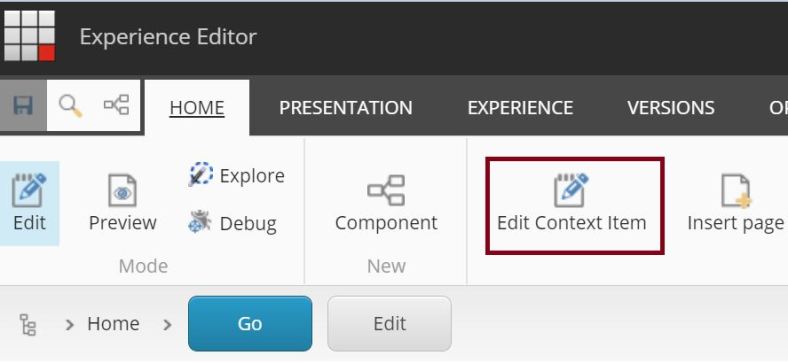
Plain Sitecore – Add Edit Context Item Button to the Experience Editor ribbon

After we added the two custom experience buttons to our renderings, we came up with the idea, to offer the editors the possibility to even edit all fields of the context item – sometimes not shown in HTML directly such as meta title, meta description and so on – without switching back to the Content Editor. Therefore we implemented the “Edit context item” button I will describe in the following.

Continue reading “Plain Sitecore – Add Edit Context Item Button to the Experience Editor ribbon”

Plain Sitecore – Custom Experience Button dynamically loading the rendering’s properties

Some time ago I described how to implement an “Edit Fields” Button without defining all fields. Now we have a look at the implementation for the rendering properties. For this we also implement a command, but need one step more.

Continue reading “Plain Sitecore – Custom Experience Button dynamically loading the rendering’s properties”

Plain Sitecore – Custom Experience Button dynamically loading the Item’s fields

We all have the same challenge: Make everything editable via Experience Editor. Sitecore itself has the EditFrame implemented and the default way is to add custom experience buttons to the rendering, but then you have to create a lot of new button items in the core database for the fields you want the editor to be able to edit.

You could use the GlassEditFrame from GlassMapper, just call the Helper function in the View and GlassMapper does everything. You can just pass the model, special fields or a path to your custom buttons.

You also could do an own implementation of an editframe wrapper and write your logic to do everything.

The last time we came to this point we decided to use the Sitecore editframe and just implement one “Edit fields” button and add it to every rendering item which has a datasource.

Continue reading “Plain Sitecore – Custom Experience Button dynamically loading the Item’s fields”