Enhance DAM Connector for retrieving additional information to an asset in Sitecore

We all know the situation: Some images are restricted and we have to display their copyright and source in the image caption. Editors want to save this information only once. So, if you use the Content Hub they want to do it there.

The work in Content Hub itself is simple, just add two string-properties to the M.Asset-schema and you can edit them for the assets. But how do you get this information in Sitecore? The DAM Connector just comes with a few properties like asset ID, public link and the property you configured to use for alt text.

This blog post gives an idea of enhancing the connector for retrieving the additional properties you need.
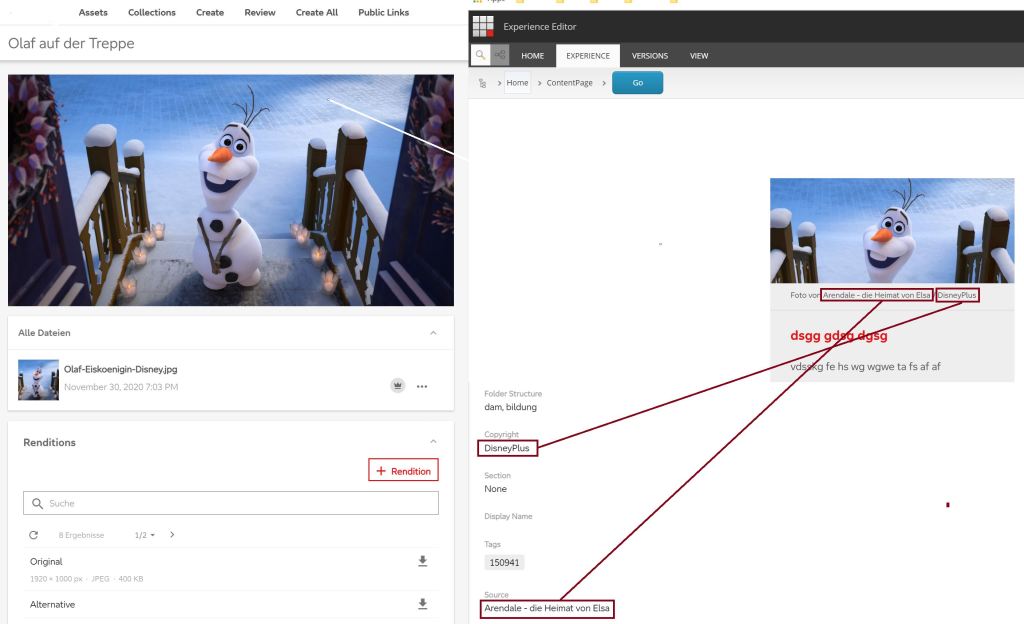
Left: Content Hub Asset with Copyright and Source. Right: Preview in Sitecore, Teaser with rendered Copyright and Source.

Continue reading “Enhance DAM Connector for retrieving additional information to an asset in Sitecore”

Content Hub: Add public link for asset via Web SDK Client

We found out how to query a specific asset and retrieve it’s public links, which is shown in the last posts. Now we want to add a new public link for a specific asset using the Web SDK Client.

Continue reading “Content Hub: Add public link for asset via Web SDK Client”

Content Hub: Get public link for asset from Web SDK Client

Today our topic is getting the public link(s) for an asset in the Content Hub via Web SDK Client. Therefore we first need the configuration and client. Keep in mind, that the user you use must be a superuser.

// Your Sitecore Content Hub endpoint to connect to
Uri endpoint = new Uri("https://yourcontenthuburl");

// Enter your credentials here         
OAuthPasswordGrant oauth = new OAuthPasswordGrant         
{             
  ClientId = "yourclientid",             
  ClientSecret = "yourclientsecret",             
  UserName = "yoursuperusername",             
  Password = "youruserpassword"         };         

// Create the Web SDK client         
IWebMClient client = MClientFactory.CreateMClient(endpoint, oauth);         client.TestConnectionAsync().Wait();

Continue reading “Content Hub: Get public link for asset from Web SDK Client”