When working with Sitecore XM Cloud it’s possible to not use the internal editing host which comes with XM Cloud but set up an external one. The Sitecore documentation helps you with this and I recommend to read the blogpost by Rob Earlam. But be reminded, ideally you use the internal editing host! Only if you can’t do it you should set up an external one.
I don’t want to repeat the steps of the setup but rather write about the challenge I came across lately: What if there is a firewall in front of the editing host?
Since there is no IP range or something similar for XM Cloud Sitecore could provide to you it is not possible to do the IP restriction. The route /api/editing/render must be publicly available.
How can you restrict the access though?
You have to open the route for the public, but you can add security by using a querystring which is sent over from XM Cloud. You add the querystring in your serverSideRenderingEngineEndpointUrl.
Let’s remember how to configure that. There are two ways: Either you configure it in a config file which you patch or in the specific settings item in your XM Cloud instance.
a) config file
If you use the config it would look similar to the following:
<?xml version="1.0"?>
<configuration xmlns:patch="http://www.sitecore.net/xmlconfig/" xmlns:set="http://www.sitecore.net/xmlconfig/set/">
  <sitecore>
    <javaScriptServices>
      <apps>
        <app name="your-site"
             sitecorePath="/sitecore/content/your tenant/your site"
             serverSideRenderingEngine="http"
             serverSideRenderingEngineEndpointUrl="https://your-app-url/api/editing/render?t=9956a603c1b333611064d031e47bdb3a742871654d41e994a90372406cde1250"
             serverSideRenderingEngineApplicationUrl="https://your-app-url"
             inherits="defaults" />
      </apps>
    </javaScriptServices>
  </sitecore>
</configuration>
b) Settings item
Navigate to sitecore/content/your tenant/your site/Settings and set the values in the related fields:
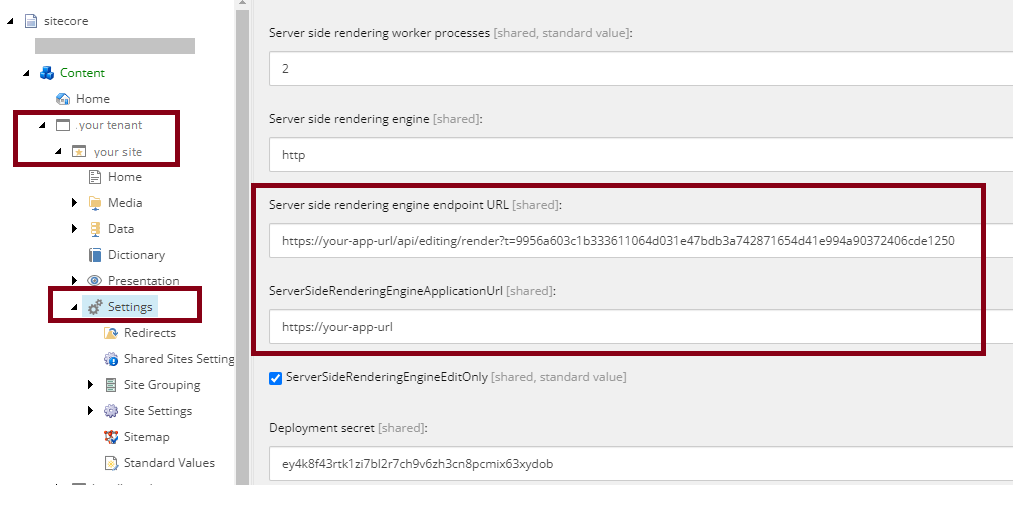
Afterwards, if possible, create a rule in your firewall. If you can’t do that you have to provide some logic in your head application to check the querystring’s value and approve or deny the access.
It is recommended to use an encrypted value, so that you can be sure (as sure as possible) that it is not guessable. In my case I chose the SHA256 encrypted version of the string “xmc-dev-your-site-2023”.
 Anna's blog