If you build a search page in Content Hub it is possible to have a filter for a date field of your entity. In the following case we want to show all assets which have an end date before today plus 30 days.
Out of the box it is possible to set a dynamic filter on a date field of an entity.
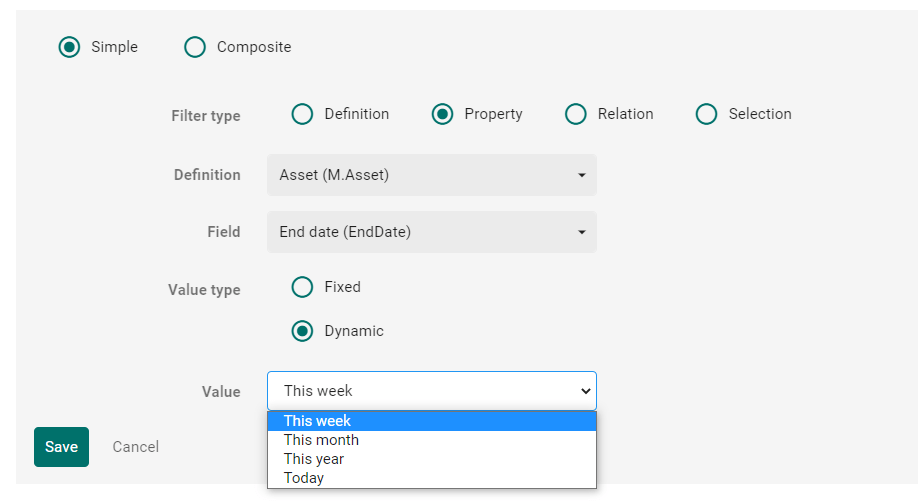
So as you can see there are different options to set, but as this is not what we want to achieve, we have to find another way.
On our page we add the search component for the assets and put in the static filters we need, like Final Lifecycle Status should be approved. For the search component we just ignore the dynamic filter. Once we finished we add an External page component.
In this component we write some Javascript which should be executed when the page is called and the search changes. So we need to subscribe to the search components events. Therefore we need the identifier of the search component.
To get the identifier we do the following. We navigate to Manage > Pages > Our search page. We click on the search component and in the URL we can see the ID of the search component. Now we call https://ourcontenthuburl/api/entities/id-of-searchcomponent.
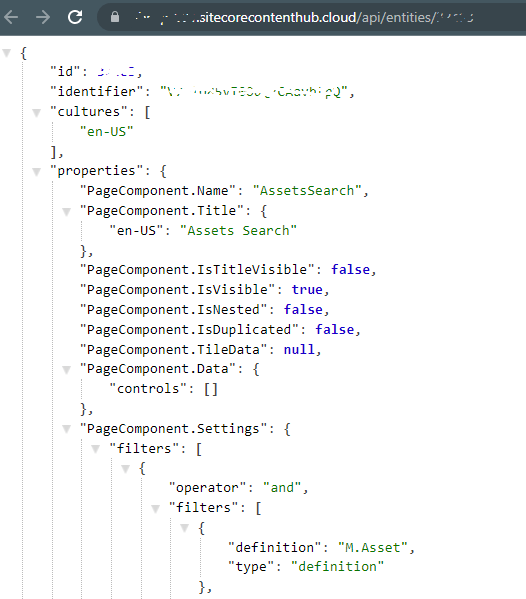
Now we have the identifier and can write our code in the external page component, which could look like the following.
const searchComponentIdentifier = "your-identifier";
const urlToGetSearchComponent = options.api.entity_by_identifier.href.split("{")[0] + searchComponentIdentifier;
let searchComponentChangeQueryContextObservable = null;

fetch(urlToGetSearchComponent)
	.then(response => response.json())
	.then(function(data)
	{
        setSearchComponentChangeQueryContextObservable(data.id);

        // subscribe to change to the search component, so that we can reapply our custom filter whenever it is changed e.g. show selected only from selection component
        searchComponentChangeQueryContextObservable.subscribe(addCustomFilterDaysAhead);

        // apply the custom filter
        addCustomFilterDaysAhead(searchComponentChangeQueryContextObservable());
    });

const setSearchComponentChangeQueryContextObservable = function(id){
    searchComponentChangeQueryContextObservable = options.contexts[`${id}ChangeQuery`];
}

const addCustomFilterDaysAhead = query => {
    //this stops the filter being applied recursively
    if(query.filters)
        return;

    const thirtydaysAhead = new Date(new Date().setDate(new Date().getDate() + 30));

    query.filters = {
        operator: "lessthan",
        values: [thirtydaysAhead.toISOString()],
        name: "EndDate"
    }

    searchComponentChangeQueryContextObservable(query)
}
As you can see we build a filter for the “EndDate” in the next 30 days in that case. (or even before, this should not be the case, because there should be other actions if an asset’s end date is exceeded.) In the Template tab you just put in an empty div. And then we are done and can check the result.
If you open the search page you can see the applied filter.
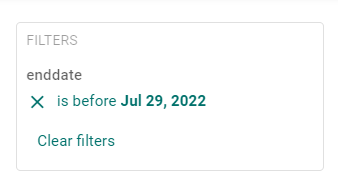
And that’s it. That is how you can extend your search via external page component. Nevertheless I would recommend to configure as much as possible in the search component itself.
 Anna's blog