Last time I wrote about our changes to the DAM connector to store extra fields in the XML raw value of the image fields in Sitecore. But what happens if these values are changed in Content Hub? We implemented storing the value in the moment we choose the asset from Content Hub. So we would have to choose again the asset which we changed in Content Hub? No way! Following I will show you our implementation of notifying Sitecore that something has changed and update the image fields in Sitecore.
First, we added an own queue in our Azure Service Bus. Therefore you go to https://portal.azure.com, login, navigate to the Azure service bus namespace in the same resource group your Sitecore CM is in and follow the steps to add a queue. And second we created a shared access policy for the queue. You can do this by navigating to your queue and then select Shared access policies from the left navigation and following the steps after clicking + Add.
Once we have setup everything in the portal we are ready to begin our work in the Content Hub. For handling actions you navigate to the Manage page and click on the Actions tile, you will be redirected to the Actions page and see an overview of the existing actions.
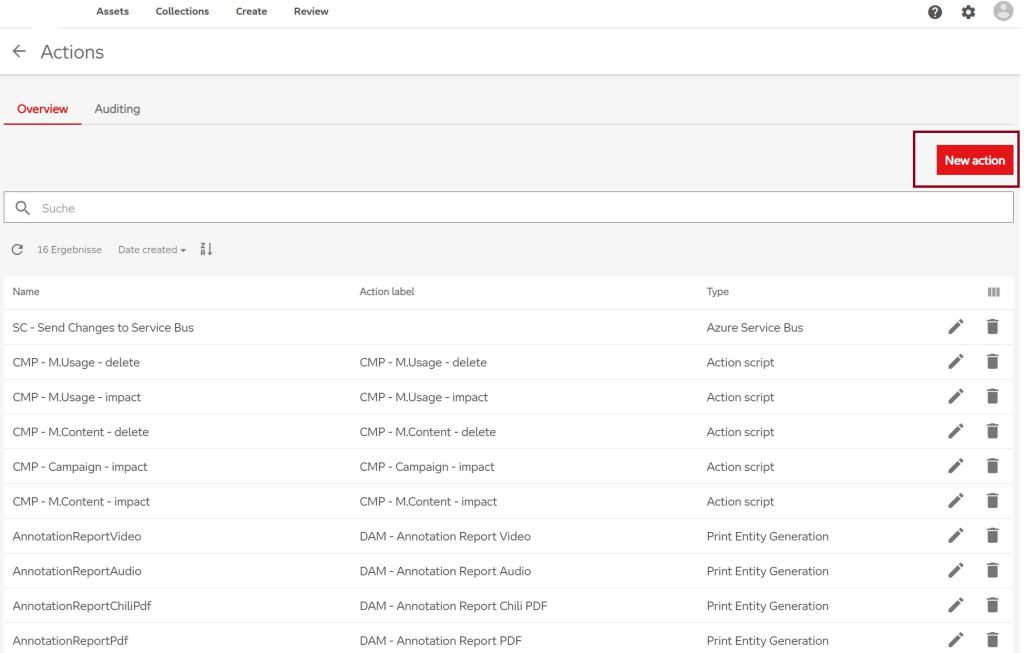
Now you setup a new action by clicking New action in the top right corner and a model appears. Choose Azure Service Bus from the Type dropdown. Now you can see, what you have to configure.
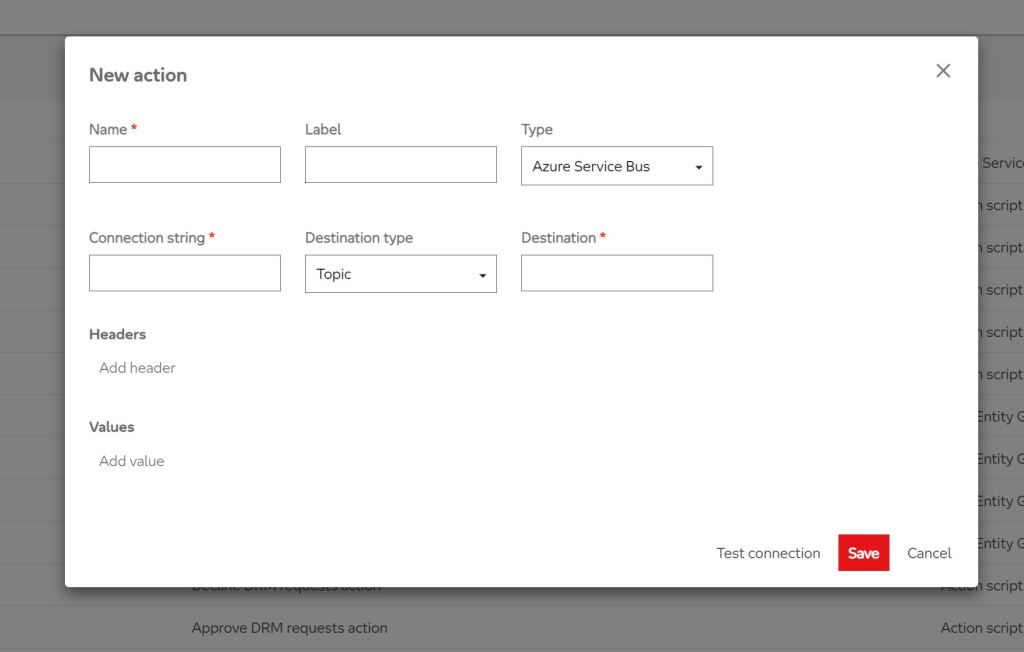
As connection string put in the Primary connection String you can find on your created Shared Access policy.

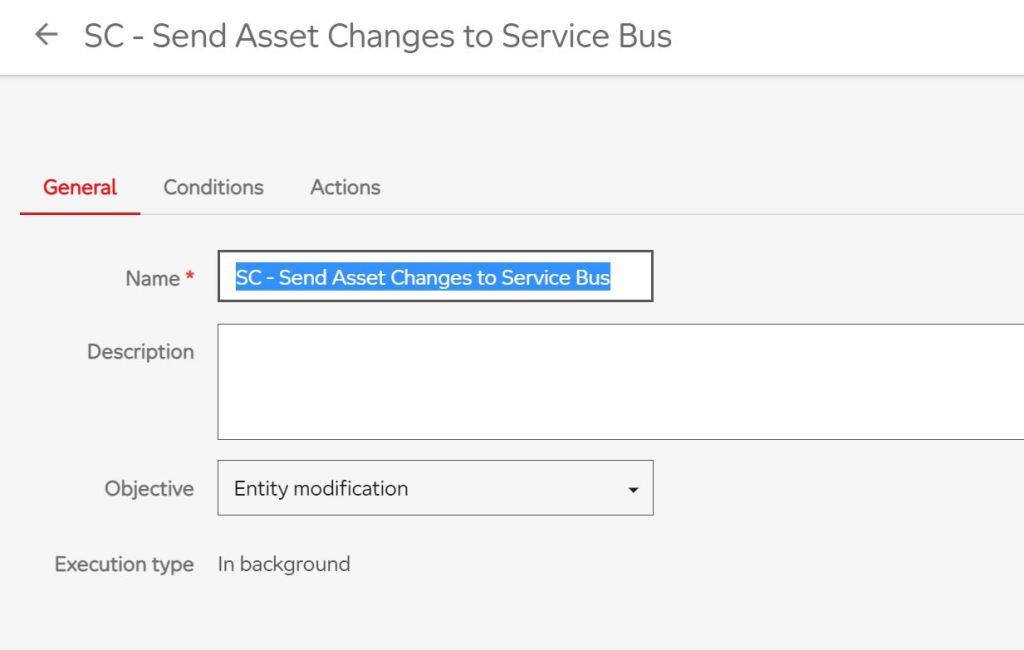
Next we do is configuring when the action should be called. For that we go to the manage page again and click on Triggers. We are redirected to the triggers page and can see an overview of all configured triggers. For adding a new one we click on New trigger in the top right corner.

Now we are able to test, if the action works properly. Therefore just navigate to any asset detail page, change at least one of the fields from your conditions, save the asset and have a look into the Azure portal. Navigate to your queue and you will see, that there is one unhandled message. You can take it and have a look into it.
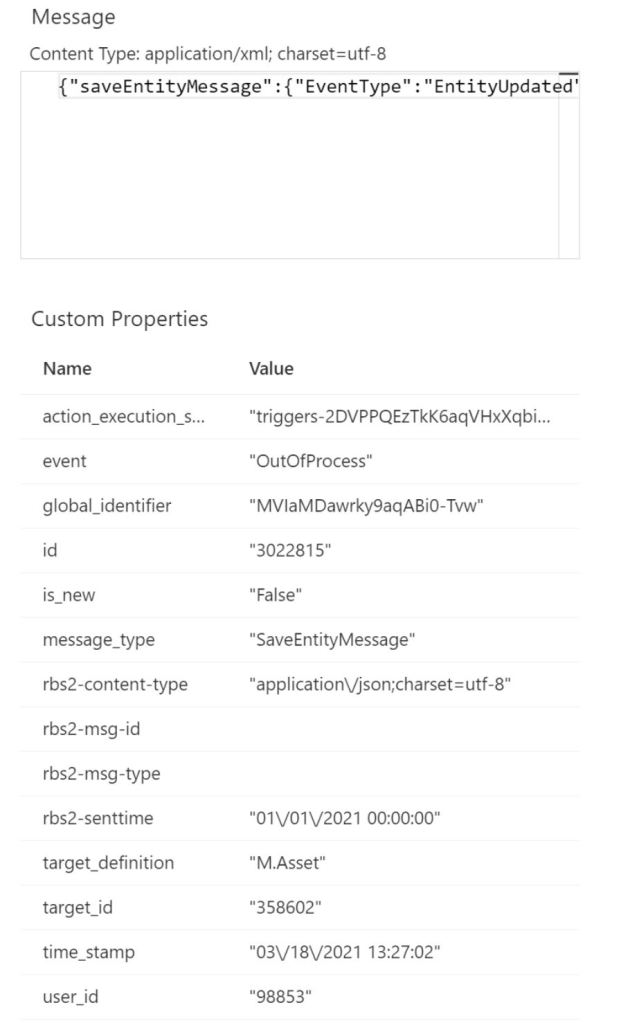
The content of the message looks like:
{
    "saveEntityMessage": {
        "EventType": "EntityUpdated",
        "TimeStamp": "2021-03-18T13:27:02.723Z",
        "IsNew": false,
        "TargetDefinition": "M.Asset",
        "TargetId": 358602,
        "TargetIdentifier": "MVIaMDawrky9aqABi0-Tvw",
        "CreatedOn": "2021-03-18T13:26:21.5978519Z",
        "UserId": 98853,
        "Version": 4,
        "ChangeSet": {
            "PropertyChanges": [{
                    "Culture": "(Default)",
                    "Property": "AltText",
                    "Type": "System.String",
                    "OriginalValue": null,
                    "NewValue": "This is the new alt text."
                }
            ],
            "Cultures": ["(Default)"],
            "RelationChanges": [{
                    "Relation": "AssetTypeToAsset",
                    "Role": 1,
                    "Cardinality": 0,
                    "NewValues": [29364],
                    "RemovedValues": []
                }, {
                    "Relation": "Tags",
                    "Role": 1,
                    "Cardinality": 1,
                    "NewValues": [153894, 153786],
                    "RemovedValues": []
                }
            ]
        }
    },
    "context": {}
}
We are able to send notifications with a change set to the Azure Service Bus and now we will handle this in Sitecore. First, we define the class which represents the message, which looks like this:
namespace Sitecore.Feature.ContentHub.Messages
{
    using System;

    public class ContentHubChangeMessage
    {
        #region Public Properties

        public SaveEntityMessage SaveEntityMessage { get; set; }

        /* Currently unknown type */
        public object Context { get; set; }

        #endregion
    }

    public class SaveEntityMessage
    {
        #region Public Properties

        public string EventType { get; set; }

        public DateTime TimeStamp { get; set; }

        public bool IsNew { get; set; }

        public string TargetDefinition { get; set; }

        public long TargetId { get; set; }

        public string TargetIdentifier { get; set; }

        public DateTime CreatedOn { get; set; }

        public long UserId { get; set; }

        public long Version { get; set; }

        public ChangeSet ChangeSet { get; set; }

        #endregion
    }

    public class ChangeSet
    {
        #region Public Properties

        public PropertyChange[] PropertyChanges { get; set; }

        public string[] Cultures { get; set; }

        /* Currently unknown type */
        public object RelationChanges { get; set; }

        #endregion
    }

    public class PropertyChange
    {
        #region Public Properties

        public string Culture { get; set; }

        public string Property { get; set; }

        public string Type { get; set; }

        public string OriginalValue { get; set; }

        public string NewValue { get; set; }

        #endregion
    }
}
Now we go back to Content Hub once again, because we have to add some specific headers to our action. This is because Sitecore bases on Rebus when handling messages in Azure Service Bus.
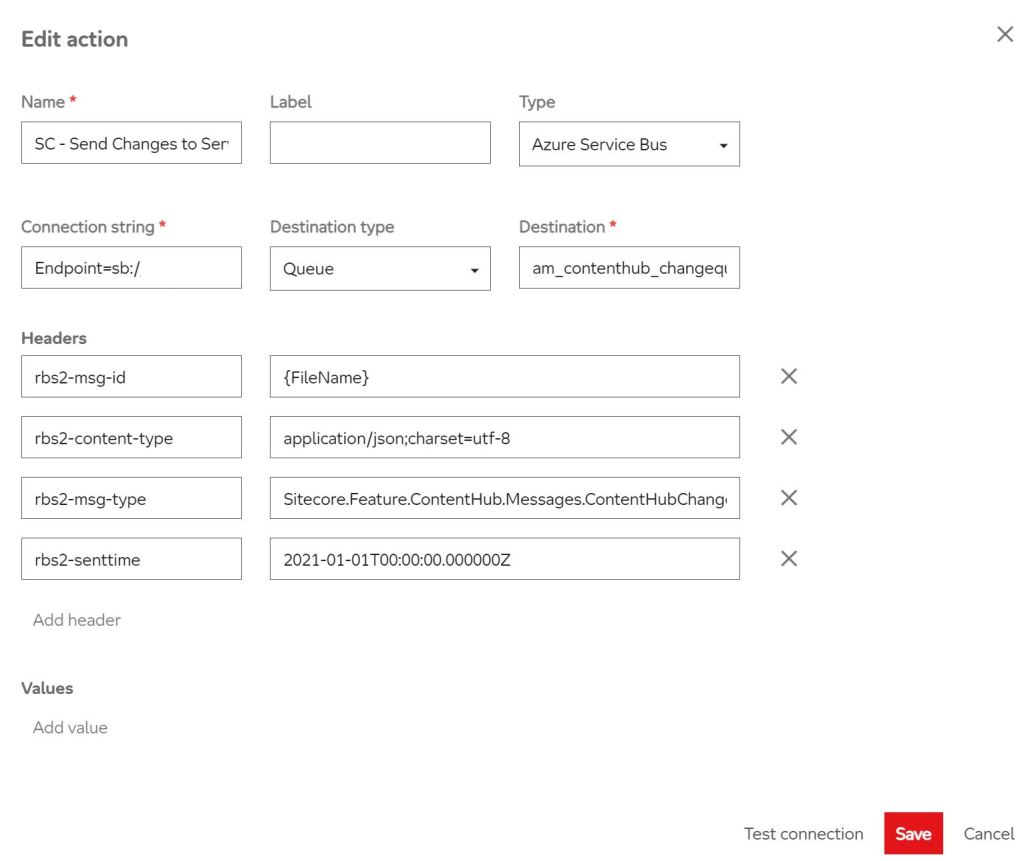
Now we add the message handling in our Sitecore solution. First we add a Servicebus representation.
namespace Feature.ContentHub.MessageBus
{
    public sealed class ContentHubChangesMessageBus
    {
    }
}
Then we add a processor in the <initialize>-pipeline.
namespace Feature.ContentHub.SC.Pipelines.Initialize
{
    using System;
    using Sitecore.Feature.ContentHub.MessageBus;
    using Sitecore.Framework.Messaging;
    using Sitecore.Pipelines;

    public class InitializeContentHubChangesMessaging
    {
        #region Private ReadOnly Fields

        private readonly IServiceProvider _serviceProvider;

        #endregion

        #region Public Constructors

        public InitializeContentHubChangesMessaging(IServiceProvider serviceProvider)
        {
            this._serviceProvider = serviceProvider;
        }

        #endregion

        #region Public Methods

        public void Process(PipelineArgs args)
        {
            this._serviceProvider.StartMessageBus<ContentHubChangesMessageBus>();
        }

        #endregion
    }
}
Now we need the message handler which does something with the content of the service bus message. Therefore we add a new class.
namespace Feature.ContentHub.Handlers
{
    using System.Collections.Generic;
    using System.Threading.Tasks;
    using .Feature.ContentHub.Messages;
    using Feature.ContentHub.Models;
    using Feature.ContentHub.Services;
    using Sitecore.Framework.Messaging;

    public class ContentHubChangesMessageHandler : IMessageHandler<ContentHubChangeMessage>
    {
        #region Private ReadOnly Fields

        private readonly Dictionary<string, string> MappingPropertiesChubToImageField;

        #endregion

        #region Public Constructors

        public ContentHubChangesMessageHandler()
        {
            this.MappingPropertiesChubToImageField = new Dictionary<string, string>();
            this.MappingPropertiesChubToImageField.Add("AltText", "alt");
            this.MappingPropertiesChubToImageField.Add("Source", "source");
            this.MappingPropertiesChubToImageField.Add("Copyright", "copyright");
        }

        #endregion

        #region Public Methods

        public Task Handle(
            ContentHubChangeMessage message,
            IMessageReceiveContext receiveContext,
            IMessageReplyContext replyContext)
        {
            if (message == null)
            {
                return Task.CompletedTask;
            }

            Dictionary<string, string> changes = new Dictionary<string, string>();

            foreach (PropertyChange change in message.SaveEntityMessage.ChangeSet.PropertyChanges)
            {
                if (this.MappingPropertiesChubToImageField.ContainsKey(change.Property))
                {
                    changes.Add(this.MappingPropertiesChubToImageField[change.Property], change.NewValue);
                }
            }

            ContentHubAssetChangeSet changeSet = new ContentHubAssetChangeSet
            {
                AssetId = message.SaveEntityMessage.TargetId.ToString(),
                PropertyChanges = changes
            };

            ContentHubAssetReferencesService service = new ContentHubAssetReferencesService();
            service.UpdateImageFields(changeSet);

            return Task.CompletedTask;
        }

        #endregion
    }
}
As you can see we call the ContentHubAssetReferencesService. We defined this one like:
namespace Feature.ContentHub.Services
{
    using System;
    using System.Collections.Generic;
    using System.Linq;
    using System.Linq.Expressions;
    using Feature.ContentHub.Models;
    using Feature.ContentHub.SC.ContentSearch.SearchResults;
    using Sitecore;
    using Sitecore.ContentSearch;
    using Sitecore.ContentSearch.Linq;
    using Sitecore.ContentSearch.Linq.Utilities;
    using Sitecore.Data;
    using Sitecore.Data.Fields;
    using Sitecore.Data.Items;
    using Sitecore.Globalization;
    using Sitecore.Publishing;
    using Sitecore.SecurityModel;

    public class ContentHubAssetReferencesService : IContentHubAssetReferencesService
    {
        #region Public Constructors

        public ContentHubAssetReferencesService()
        {
        }

        #endregion

        #region Public Methods

        public void UpdateImageFields(ContentHubAssetChangeSet changeSet)
        {
            IEnumerable<Item> relevantItems = this.GetRelevantItems(changeSet.AssetId);

            List<Item> itemsToPublish = new List<Item>();

            if (relevantItems != null)
            {
                foreach (Item relevantItem in relevantItems)
                {
                    IEnumerable<ImageField> imageFields =
                        this.GetRelevantFields(relevantItem, changeSet.AssetId);

                    if (imageFields != null && imageFields.Any())
                    {
                        this.EditImageFields(relevantItem, imageFields, changeSet);

                        // TODO: check if this really needed, because it could be the situation
                        // that the item is in draft mode.
                        this.PublishItem(relevantItem);
                    }
                }
            }
        }

        #endregion

        #region Private Methods

        private IEnumerable<Item> GetRelevantItems(string assetId)
        {
            Language deDeLang = Language.Parse("de-DE");

            Item rootItem = Database.GetDatabase("master").GetItem(ItemIDs.RootID, deDeLang);

            using (IProviderSearchContext context = ContentSearchManager.CreateSearchContext(
                new SitecoreIndexableItem(rootItem)))
            {
                IQueryable<ContentHubImagesSearchResultItem> query =
                    context.GetQueryable<ContentHubImagesSearchResultItem>(
                        new CultureExecutionContext(
                            rootItem.Language.CultureInfo, CulturePredicateType.Must));

                Expression<Func<ContentHubImagesSearchResultItem, bool>> filter =
                    PredicateBuilder.True<ContentHubImagesSearchResultItem>();
                filter =
                    filter.And(x => x.Paths.Contains(rootItem.ID) && x.ItemId != rootItem.ID);

                filter =
                    filter.And(x => x.ContentHubAssetIds.Contains(assetId));

                SearchResults<ContentHubImagesSearchResultItem> results =
                    query
                    .Where(filter)
                    .GetResults();

                if (results.Any())
                {
                    return results.Hits.Select(h => h.Document.GetItem());
                }

                return null;

            }

        }

        private IEnumerable<ImageField> GetRelevantFields(Item item, string assetId)
        {
            IEnumerable<Field> imageFields = item.Fields.Where(f => f.TypeKey == "image");

            foreach (Field imageField in imageFields)
            {
                string originalAssetId = ((ImageField)imageField).GetAttribute("stylelabs-content-id");

                if (!string.IsNullOrEmpty(originalAssetId) && originalAssetId == assetId)
                {
                    yield return imageField;
                }
            }
        }

        private void EditImageFields(
            Item item, IEnumerable<ImageField> imageFields, ContentHubAssetChangeSet changeSet)
        {
            foreach (Item itemVersion in item.Versions.GetVersions())
            {
                using (new SecurityDisabler())
                {
                    using (new EditContext(itemVersion, false, false))
                    {
                        foreach (ImageField imageField in imageFields)
                        {
                            foreach (KeyValuePair<string, string> change in changeSet.PropertyChanges)
                            {
                                imageField.SetAttribute(change.Key, change.Value);
                            }
                        }
                    }
                }
            }

        }

        private void PublishItem(Item item)
        {
            using (new SecurityDisabler())
            {

                PublishOptions publishOptions =
                       new PublishOptions(item.Database,
                                          Database.GetDatabase("web"),
                                          PublishMode.SingleItem,
                                          item.Language,
                                          DateTime.Now);

                publishOptions.UserName = "sitecore\\admin";
                Publisher publisher = new Publisher(publishOptions);
                publisher.Options.RootItem = item;
                publisher.Options.Deep = false;

                publisher.PublishAsync();
                item.Publishing.ClearPublishingCache();
            }
        }

        #endregion
    }
}
As you can see what we do is searching for all items which references the specific asset id in one or more of its image fields and update the value of these fields and publish the items.
To find the items via Search we added a custom search field.
namespace Feature.ContentHub.SC.ContentSearch.ComputedFields
{
    using System.Collections.Generic;
    using System.Linq;
    using System.Xml;
    using Sitecore.ContentSearch;
    using Sitecore.ContentSearch.ComputedFields;
    using Sitecore.Data.Fields;
    using Sitecore.Data.Items;

    public class ContentHubImagesComputedField : AbstractComputedIndexField
    {
        #region Public Constructors

        public ContentHubImagesComputedField(XmlNode configNode) : base(configNode)
        {
        }

        #endregion

        #region Public Override Methods

        public override object ComputeFieldValue(IIndexable indexable)
        {
            Item item = indexable as SitecoreIndexableItem;

            if (item == null)
            {
                return null;
            }

            IEnumerable<Field> imageFields = item.Fields.Where(f => f.TypeKey == "image");

            if (!imageFields.Any())
            {
                return null;
            }

            List<string> assetIds = new List<string>();

            foreach (Field imageField in imageFields)
            {
                string assetId = ((ImageField)imageField).GetAttribute("stylelabs-content-id");

                if (!string.IsNullOrEmpty(assetId))
                {
                    assetIds.Add(assetId);
                }
            }

            if (!assetIds.Any())
            {
                return null;
            }

            return assetIds;
        }

        #endregion
    }
}
Since we work in this case with Sitecore 9.3 we have to configure the custom field slightly different from former versions.
<configuration xmlns:patch="http://www.sitecore.net/xmlconfig/">
    <sitecore>
        <contentSearch>
            <indexConfigurations>
                <defaultSolrIndexConfiguration type="Sitecore.ContentSearch.SolrProvider.SolrIndexConfiguration, Sitecore.ContentSearch.SolrProvider">
                    <documentOptions>
                        <fields hint="raw:AddComputedIndexField">
                            <field fieldName="_contenthub_images" type="Feature.ContentHub.SC.ContentSearch.ComputedFields.ContentHubImagesComputedField, Feature.ContentHub" returnType="stringCollection">
                            </field>
                        </fields>
                    </documentOptions>
                </defaultSolrIndexConfiguration>
            </indexConfigurations>
        </contentSearch>
    </sitecore>
</configuration>
So, now we defined everyting. We added a class which represents the Service Bus message and added a message handler. We implemented the code what should happen when the message arrives. Last thing we have to do is add the configuration that in our case the specific code should be called.
<configuration xmlns:patch="http://www.sitecore.net/xmlconfig/" xmlns:role="http://www.sitecore.net/xmlconfig/role/" xmlns:messagingTransport="http://www.sitecore.net/xmlconfig/messagingTransport/">
    <sitecore>
        <services>
            <configurator type="Feature.ContentHub.Configurations.ContentHubChangesMessageReceiverConfiguration, Feature.ContentHub" role:require="(Standalone or ContentManagement) and !ContentDelivery" />
        </services>

        <initialize>
            <processor type="Feature.ContentHub.SC.Pipelines.Initialize.InitializeContentHubChangesMessaging, Feature.ContentHub" resolve="true" role:require="(Standalone or ContentManagement) and !ContentDelivery" />
        </initialize>

        <Messaging>
            <Rebus>
                <Feature.ContentHub.MessageBus.ContentHubChangesMessageBus role:require="(Standalone or ContentManagement) and !ContentDelivery">
                    <Transport>
                        <SqlServer messagingTransport:require="SQL">
                            <OneWay role:require="(Standalone or ContentManagement) and !ContentDelivery">false</OneWay>
                            <OneWay role:require="ContentDelivery">true</OneWay>
                            <ConnectionStringOrName>messaging</ConnectionStringOrName>
                            <InputQueueName>contenthub_changequeue</InputQueueName>
                        </SqlServer>
                        <AzureServiceBus messagingTransport:require="AzureServiceBus">
                            <OneWay role:require="(Standalone or ContentManagement) and !ContentDelivery">false</OneWay>
                            <OneWay role:require="ContentDelivery">true</OneWay>
                            <ConnectionStringOrName>messaging</ConnectionStringOrName>
                            <TableName>Sitecore_Transport</TableName>
                            <InputQueueName>contenthub_changequeue</InputQueueName>
                        </AzureServiceBus>
                    </Transport>
                    <Routing>
                        <TypeBasedMappings>
                            <TypeMappings>
                                <ContentHubChangeMessageMapping>
                                    <Type>Feature.ContentHub.Messages.ContentHubChangeMessage, Feature.ContentHub</Type>
                                    <DestinationQueue>contenthub_changequeue</DestinationQueue>
                                </ContentHubChangeMessageMapping>
                            </TypeMappings>
                        </TypeBasedMappings>
                    </Routing>
                    <Options role:require="(Standalone or ContentManagement) and !ContentDelivery">
                        <SetNumberOfWorkers>1</SetNumberOfWorkers>
                        <SimpleRetryStrategy>
                            <ErrorQueueAddress>Error</ErrorQueueAddress>
                            <MaxDeliveryAttempts>1</MaxDeliveryAttempts>
                            <SecondLevelRetriesEnabled>false</SecondLevelRetriesEnabled>
                        </SimpleRetryStrategy>
                    </Options>
                    <Logging Type="Sitecore.Messaging.SitecoreLoggerFactory, Sitecore.Messaging"/>
                </Feature.ContentHub.MessageBus.ContentHubChangesMessageBus>
            </Rebus>
        </Messaging>
    </sitecore>
</configuration>
And that’s it. For debugging you have to configure two things.
In the ConnectionStrings.config you replace the messaging entry with an entry which calls the service bus.
<add name="messaging" connectionString="Endpoint=sb://your-servicebus-url/;SharedAccessKeyName=RootManageSharedAccessKey;SharedAccessKey=your_shared_access_key" />
And in the web.config you change the value of the messagingTransport:define node fro SQL to AzureServiceBus.
Now attach to your process, set a breakpoint in the message handler and change at least one of the conditional fields for the Content Hub action on any asset and see that after a few moments your breakpoint is hit.
 Anna's blog