We all know the situation: Some images are restricted and we have to display their copyright and source in the image caption. Editors want to save this information only once. So, if you use the Content Hub they want to do it there.
The work in Content Hub itself is simple, just add two string-properties to the M.Asset-schema and you can edit them for the assets. But how do you get this information in Sitecore? The DAM Connector just comes with a few properties like asset ID, public link and the property you configured to use for alt text.
This blog post gives an idea of enhancing the connector for retrieving the additional properties you need.
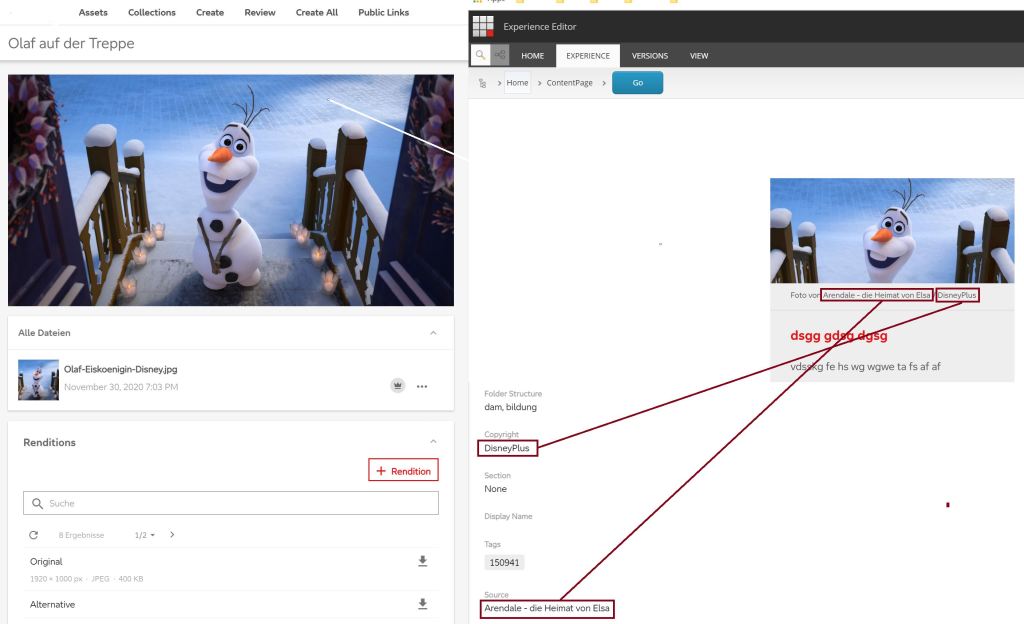
First of all, we are talking about Sitecore Connect for Sitecore DAM 2.0.0 used in Sitecore XP 9.3. For installation and configuration follow the instructions: https://docs.stylelabs.com/content/3.4.x/user-documentation/content-user-manual/integrate/sitecore-connect-for-sitecore-dam/setup.html.
In newer versions of the connector you do it differently, which is decsribed in the Sitecore documentation. For example for Sitecore Connect for Content Hub 5.1: https://doc.sitecore.com/xp/en/developers/connect-for-ch/51/connect-for-content-hub/change-the-image-tag-attribute-mapping-in-sitecore.html
Now I will tell you what we did to enhance the connector. When we had a look into the Stylelabs.M.Sitecore.Integration.Components.dll which comes with the connector-package, we found out that we unfortunately have to copy the code of the two classes MImageCommand (called when choosing an image via edit frame button in Experience Editor) and MImageControl (called when choosing Image via content hub link in imagefield in Content Editor), because the functions we need to overwrite are protected.

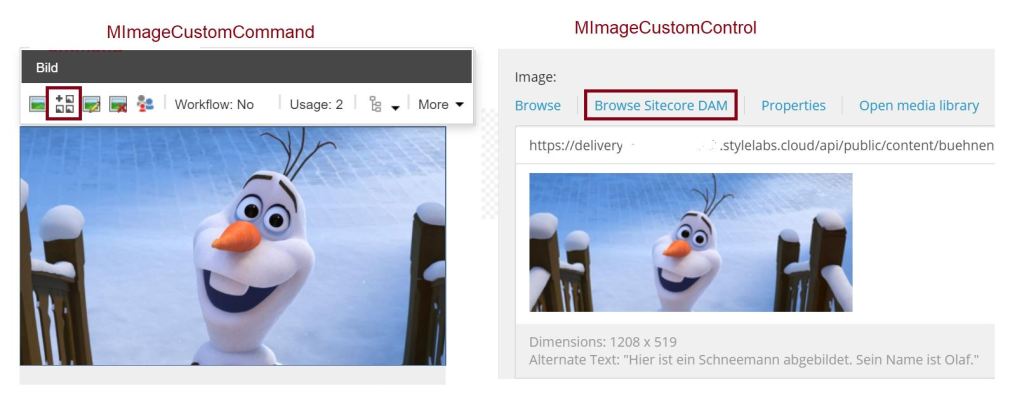
The following shows the Command. We created a class MImageCustomCommand and copied everything from MImageCommand. Then we put in our customization.
public class MImageCustomCommand : ChooseImage
{
   protected new static void Run(ClientPipelineArgs args)
   {
       if (args.IsPostBack)
       {
          if (!string.IsNullOrWhiteSpace(args.Result) && args.Result != "undefined")
          {
               Item itemNotNull = Client.GetItemNotNull(
                   args.Parameters["itemid"], Language.Parse(args.Parameters["language"]));

              itemNotNull.Fields.ReadAll();
              Field field = itemNotNull.Fields[args.Parameters["fieldid"]];
              string str = args.Parameters["controlid"];
              ImageField imageField = new ImageField(field, field.Value);
              MDialogResult mDialogResult = JToken.Parse(args.Result).ToObject<MDialogResult>();

              /* Custom */
              IContentHubService chubService = ServiceLocator.ServiceProvider.GetService<IContentHubService>();

              CHubAsset asset = AsyncUtil.RunSync<CHubAsset>(async () =>
                  await chubService.GetAssetDetailsById(long.Parse(mDialogResult.Id)));

               if (asset != null)
               {
                  imageField.SetAttribute("copyright", asset.Copyright);
                  imageField.SetAttribute("source", asset.Source);
                }
                /* Custom End */

                imageField.SetAttribute("stylelabs-content-id", mDialogResult.Id.ToString());
                [...]
           }
     }
}
As you can see we use our ContentHubService to retrieve the asset from Content Hub. How to solve this using the C# Web SDK you can see in a former blogpost: https://anbrue.net/2020/11/01/content-hub-search-specific-assets-via-api
We retrieve the asset with the needed properties and save them to the image field.
The second class we called MImageCustomControl, this is the one when the image is chosen from Content Editor. We again copied the code from MImageControl and just customized one method:
protected void BrowseMImage(ClientPipelineArgs args)
 {
    if (args.IsPostBack)
    {
        if (!string.IsNullOrWhiteSpace(args.Result) && args.Result != "undefined")
        {
           MDialogResult mDialogResult = JToken.Parse(args.Result).ToObject<MDialogResult>();

           /* Custom */
           IContentHubService chubService = ServiceLocator.ServiceProvider.GetService<IContentHubService>();));

           // Set source and copyright
           CHubAsset asset = AsyncUtil.RunSync<CHubAsset>(async () => await
                 chubService.GetAssetDetailsById(long.Parse(mDialogResult.Id)));

           if (asset != null)
           {
                base.XmlValue.SetAttribute("copyright", asset.Copyright);
                base.XmlValue.SetAttribute("source", asset.Source);
            }
            else
            {
                Sitecore.Diagnostics.Log.Error(
                    "ContentHub Service seems to be not well configured. Check Foundation.ContentHub.config!",
                      typeof(MImageCustomControl));
            }
            /* Custom End */

            base.XmlValue.SetAttribute("stylelabs-content-id", mDialogResult.Id.ToString());
            [...]
        }
    }
}
Again we just call our service, retrieve the asset, get the properties and save them to the image field.
Now that we have our code, we have to do the configuration, so that this code is called. For the command called from Experience Editor we need the following in the Sitecore commands configuration.
<configuration xmlns:patch="http://www.sitecore.net/xmlconfig/"
   xmlns:set="http://www.sitecore.net/xmlconfig/set/">
  <sitecore>
     <commands>
        <command name="webedit:chooseMImage"
           type="Foundation.ContentHubConnector.Components.MImageCustomCommand,
                      Foundation.ContentHubConnector" />
     </commands>
  </sitecore>
</configuration>
For the control, called from Content Editor, we do not have to change the configuration. The message is configured in the core DB item.
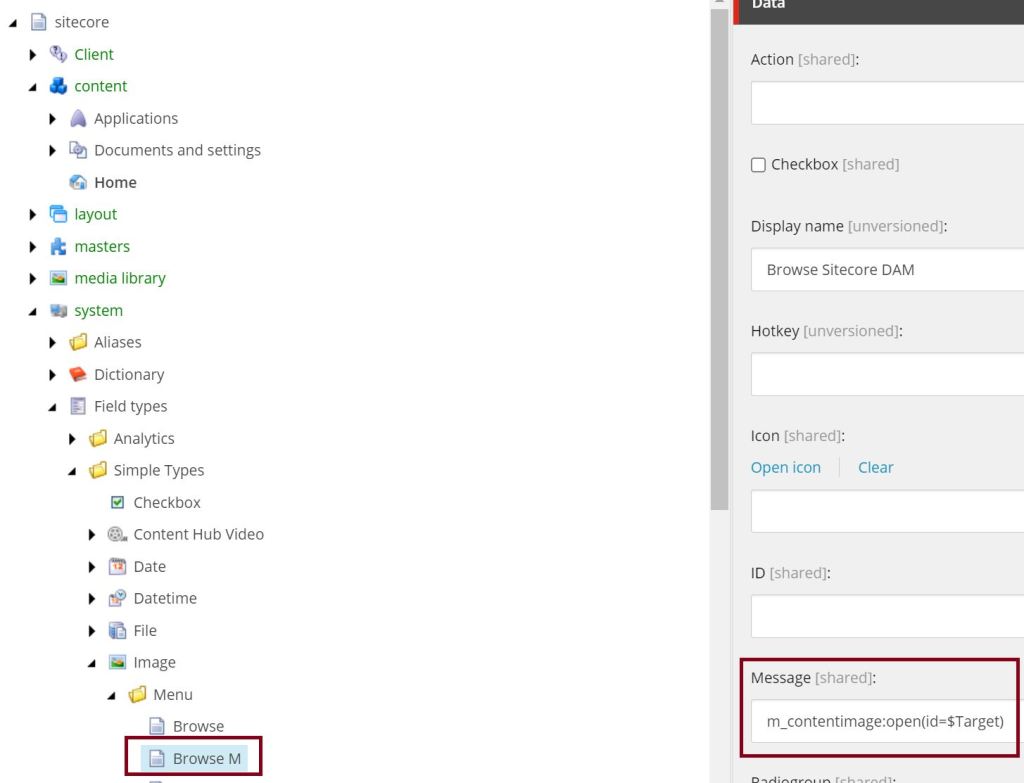
And the handling of the message is in our class MImageCustomControl:
        public override void HandleMessage(Message message)
        {
            base.HandleMessage(message);
            if (message["id"] == ID && message.Name == "m_contentimage:open")
            {
                Sitecore.Context.ClientPage.Start(this, "BrowseMImage");
            }
        }

        protected void BrowseMImage(ClientPipelineArgs args)
        {
            [...]
        }
So what is the result so far?
When we choose an image from Content Hub we retrieve the additional properties and these are written into the XML-value of the image field.

Now you can access the properties and display them on the website as you want.
 Anna's blog
Hi Anna,
There is a much easier way to achieve the same:
https://doc.sitecore.com/xp/en/developers/connect-for-ch/51/connect-for-content-hub/change-the-image-tag-attribute-mapping-in-sitecore.html
Your article may mislead people in the wrong direction. Can you update your article with a link above, please?
LikeLike
Hey Anton thank you for the hint but I already made clear that this is for the DAM connector 2.0.0 and XP 9.3, don’t you think that is enough? You are pointing to a complete other version of the connector.
LikeLike
I haven’t checked the old versions.
I think it makes sense to add a link to the official documentation for the new connector versions. Your blog has better indexing than Sitecore documentation for the question “Retrieving additional information from DAM to Sitecore”.
LikeLike
Ahhh okay, I wasn’t aware of that, I’ll add an info and the link to the documentation in that case. Thanks for the feedback!
LikeLike