We all have the same challenge: Make everything editable via Experience Editor. Sitecore itself has the EditFrame implemented and the default way is to add custom experience buttons to the rendering, but then you have to create a lot of new button items in the core database for the fields you want the editor to be able to edit.
You could use the GlassEditFrame from GlassMapper, just call the Helper function in the View and GlassMapper does everything. You can just pass the model, special fields or a path to your custom buttons.
You also could do an own implementation of an editframe wrapper and write your logic to do everything.
The last time we came to this point we decided to use the Sitecore editframe and just implement one “Edit fields” button and add it to every rendering item which has a datasource.
Therefore we first added some code for getting all the fields from an item we need via an ItemExtension.
/// <summary>
/// Gets the list of custom fields for the current item.
/// </summary>
/// <param name="item">
/// The item for which the custom fields should be retrieved.
/// </param>
/// <returns>
/// Returns the list of custom fields, even in base
/// templates, for the current item.
/// </returns>
public static List<FieldDescriptor> CreateFieldDescriptors(
  this Item item)
{
  Template template = TemplateManager.GetTemplate(
     item.TemplateID, item.Database);

  TemplateField[] allFields = template.GetFields(true);

  List<string> fields = allFields
     .Where(ItemUtil.IsDataField)
     .Select(x => x.Name).ToList();

  List<FieldDescriptor> fieldList =
     new List<FieldDescriptor>();

  ListString fieldString = new ListString(fields);

  foreach (string field in new ListString(fieldString))
  {
     fieldList.Add(new FieldDescriptor(item, field));
  }

  return fieldList;
}
The second step is to write the Sitecore command which should be executed when clicking the button.
namespace Foundation.ExperienceEditor.Commands
{
 using System.Collections.Generic;
 using System.Collections.Specialized;
 using Foundation.Common.Extensions;
 using Sitecore;
 using Sitecore.Data;
 using Sitecore.Data.Items;
 using Sitecore.Diagnostics;
 using Sitecore.Shell.Applications.WebEdit;
 using Sitecore.Web.UI.Sheer;

 /// <summary>
 /// Represents an enhanced verison of <see
 /// cref="Sitecore.Shell.Applications.WebEdit.Commands.FieldEditor"/>
 /// with getting the fields dynamically.
 /// </summary>
 public class FieldEditor :
  Sitecore.Shell.Applications.WebEdit.Commands.FieldEditor
 {
   #region Protected Overridden Methods

   /// <summary>
   /// Gets all options from base class, only the fields are get
   /// via private function, because
   /// they are not passed through pipeline.
   /// </summary>
   /// <param name="args">
   /// The arguments which come from click-command in
   /// webedit button item's field "Click".
   /// </param>
   /// <param name="form">
   /// The current form for the current page in which the
   /// webedit button is clicked.
   /// </param>
   /// <returns></returns>
   protected override PageEditFieldEditorOptions GetOptions(
       ClientPipelineArgs args, NameValueCollection form)
   {
     Assert.ArgumentNotNull((object)args, nameof(args));
     Assert.ArgumentNotNull((object)form, nameof(form));

     Item datasourceItem = Database.GetItem(
      ItemUri.Parse(args.Parameters["uri"]));

     Assert.IsNotNull((object)datasourceItem, "item");

     string commandID = args.Parameters["command"];

     Assert.IsNotNullOrEmpty(commandID,
      "Field Editor command expects 'command' parameter");

     Item commandItem =
      Client.CoreDatabase.GetItem(commandID);

     Assert.IsNotNull((object)commandItem, "command item");

     List<FieldDescriptor> fieldDescriptorList =
      datasourceItem.CreateFieldDescriptors();

     PageEditFieldEditorOptions fieldEditorOptions =
      new PageEditFieldEditorOptions(form,
       (IEnumerable<FieldDescriptor>)fieldDescriptorList);

     fieldEditorOptions.Title = commandItem["Title"];
     fieldEditorOptions.Icon = commandItem["Icon"];

     return fieldEditorOptions;
    }

     #endregion
   }
}
The last step in the solution is to add the custom command in the config.
<configuration xmlns:patch="http://www.sitecore.net/xmlconfig/">
 <sitecore>
  <commands>
   <command name="webedit:editdatasourcefields" type=
    "Foundation.ExperienceEditor.Commands.FieldEditor,
     Foundation.ExperienceEditor" />
   </commands>
 </sitecore>
</configuration>
Last but not least we add the Edit Fields button in the core database under /sitecore/content/Applications/WebEdit/Custom Experience Buttons.
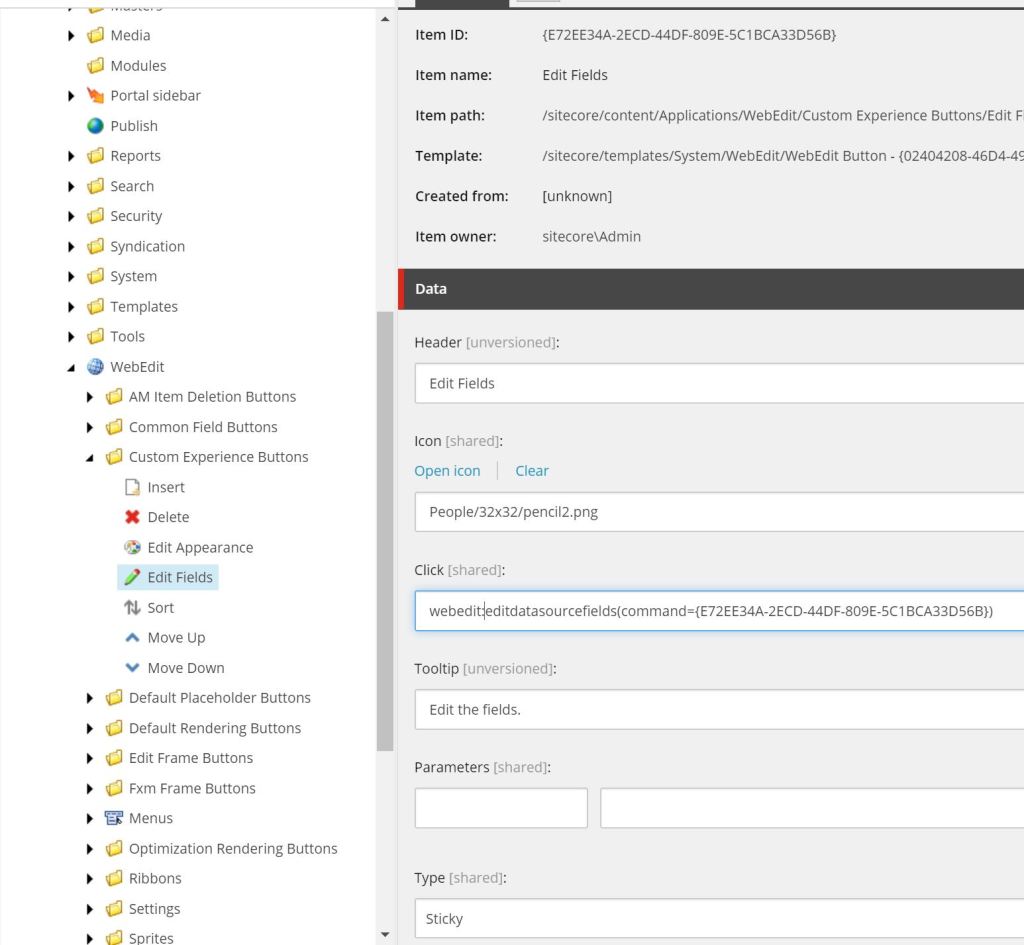
Now we can add the button to every rendering item for which we want to be the datasource item’s fields editable via Experience Editor. If the editor clicks on the button in the Edit Frame all fields (except for the standard fields) for the item are displayed int the popup.
 Anna's blog
One thought on “Plain Sitecore – Custom Experience Button dynamically loading the Item’s fields”