We came up with following: We had to find out the Rendering Item for a given Datasource Item. We thought it is a good idea to use ContentSearch for this: searching for the items with template “Controller Rendering” with the Datasource template which is equal to the fullpath of the template of our datasource item.
First we had a look into solr to make sure, that the field “Datasource Template” is crawled – It is.
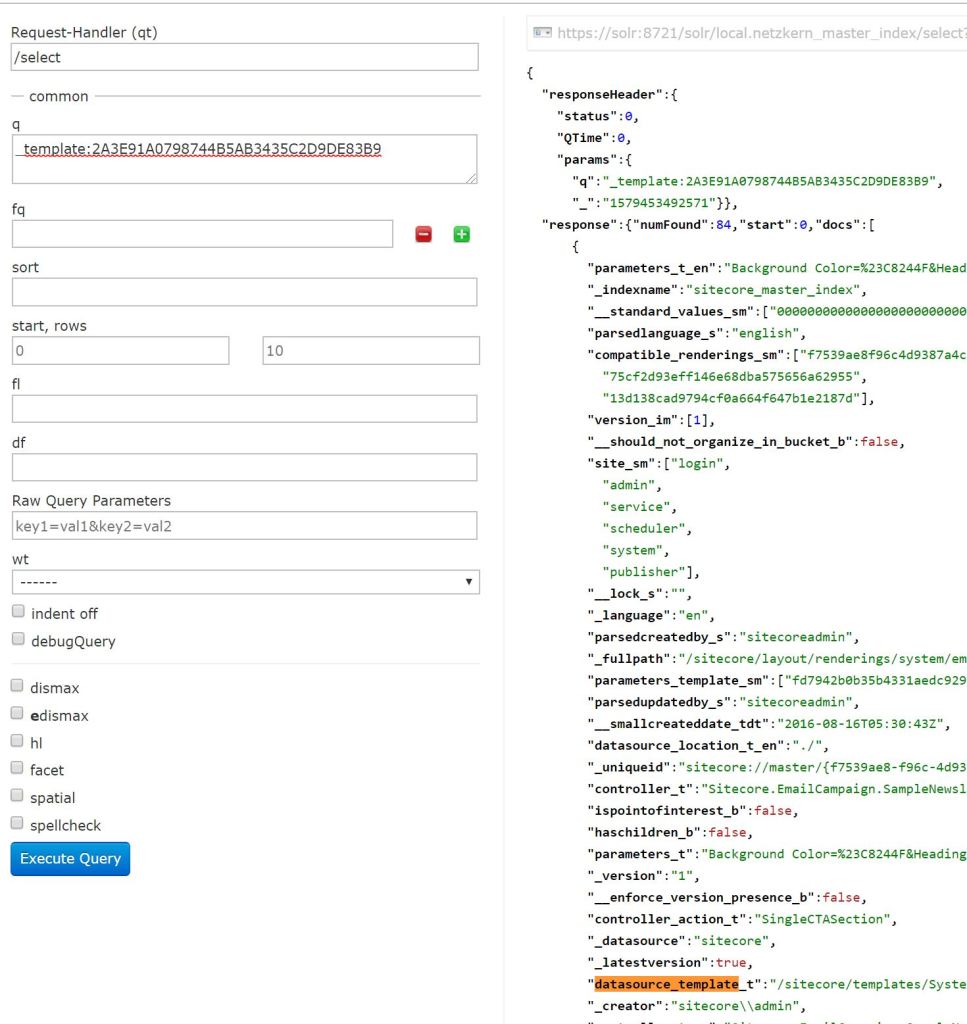
As you can see: it is crawled. “_t” is dynamically added and represents that the type of the field is “text_general”.
So, we know that the field is crawled – now we can build our Solr Query.
SitecoreIndexableItem indexable = new SitecoreIndexableItem(datasourceItem);

using (var ctx = ContentSearchManager.CreateSearchContext(indexable))
{
	var query = ctx.GetQueryable<SearchResult>()
		.Where(x => x.TemplateId == new ID("{2A3E91A0-7987-44B5-AB34-35C2D9DE83B9}"))
		.Where(x => x["datasource_template"] == datasourceItem.Template.InnerItem.Paths.ContentPath)
		.GetResults()
		.Hits
		.Select(x => x.Document);
}
We get no result for this query – but why?
The problem is that the query is not translated correctly to solr.
Solr Query - ?q=(_template:(2a3e91a0798744b5ab3435c2d9de83b9) AND datasource_template:("path_to_My_datasource"))[...]You can see, that the field “datasource_template” is called, but it should be “datasource_template_t” as we can see in Solr.
And here is the next problem. Because the datasource template field is a reference field it is mapped to text in solr. We have to check if the value exactly matches the path to our datasource template item, so we need to customize the indexconfiguration. Therfore we added the field “datasource_template” with string as return type in the following node.
<contentSearch>
  <indexConfigurations>
    <defaultSolrIndexConfiguration>
      <fieldNames hint="raw:AddFieldByFieldName">
	<field fieldName="datasource_template"  returnType="string" />
      </fieldNames>
    </defaultSolrIndexConfiguration>
 </indexConfigurations>
</contentSearch>
After adding the field we rebuilded the indexes and now our query gets a result an we can find the rendering item for our datasource item!
If you don’t have a one-to-one relation between datasource template and rendering item you have to take the first result and perhaps you should modify the query so that it fits your needs.
 Anna's blog