When you have to change the certificate, it’s not enough to change the corresponding thumbrint in the connection strings in your web.
Following you will find all places where to edit the thumbprint.
In your webs you should change the \App_Config\ConnectionStrings.config.
<add name="sitecore.reporting.client.certificate" connectionString="StoreName=My;StoreLocation=LocalMachine;FindType=FindByThumbprint;FindValue={new-thumbprint}" />

<add name="xconnect.collection.certificate" connectionString="StoreName=My;StoreLocation=LocalMachine;FindType=FindByThumbprint;FindValue={new-thumbprint}" />

<add name="xdb.marketingautomation.operations.client.certificate" connectionString="StoreName=My;StoreLocation=LocalMachine;FindType=FindByThumbprint;FindValue={new-thumbprint}" />

<add name="xdb.marketingautomation.reporting.client.certificate" connectionString="StoreName=My;StoreLocation=LocalMachine;FindType=FindByThumbprint;FindValue={new-thumbprint}" />

<add name="xdb.referencedata.client.certificate" connectionString="StoreName=My;StoreLocation=LocalMachine;FindType=FindByThumbprint;FindValue={new-thumbprint}" />
In your XConnect web you have to edit different configs.
First check the XConnect Web itself and change your \App_Config\AppSettings.config.
<add key="validateCertificateThumbprint" value="{new-thumbprint}" />Second check your automation engine and edit the \App_Data\jobs\continous\AutomationEngine\App_Config\ConnectionStrings.config.
<add name="xconnect.collection.certificate" connectionString="StoreName=My;StoreLocation=LocalMachine;FindType=FindByThumbprint;FindValue={new-thumbprint}" />Last you move to the processing engine and change the \App_Data\jobs\continous\ProcessingEngine\App_Config\ConnectionStrings.config.
<add name="xconnect.collection.certificate" connectionString="StoreName=My;StoreLocation=LocalMachine;FindType=FindByThumbprint;FindValue={new-thumbprint}" />

<add name="xconnect.configuration.certificate" connectionString="StoreName=My;StoreLocation=LocalMachine;FindType=FindByThumbprint;FindValue={new-thumbprint}" />

<add name="xconnect.search.certificate" connectionString="StoreName=My;StoreLocation=LocalMachine;FindType=FindByThumbprint;FindValue={new-thumbprint}" />
If you use the same certificate for xconnect and identity server, you have to edit In your edit the \Config\production\Sitecore.IdentityServer.Host.xml.
(By default when you set up an XP0 identityserver and xconnect use different certificates)
<CertificateThumbprint>{new-thumbprint}</CertificateThumbprint>Be aware of the inivisible chars when copying the thumbprint.
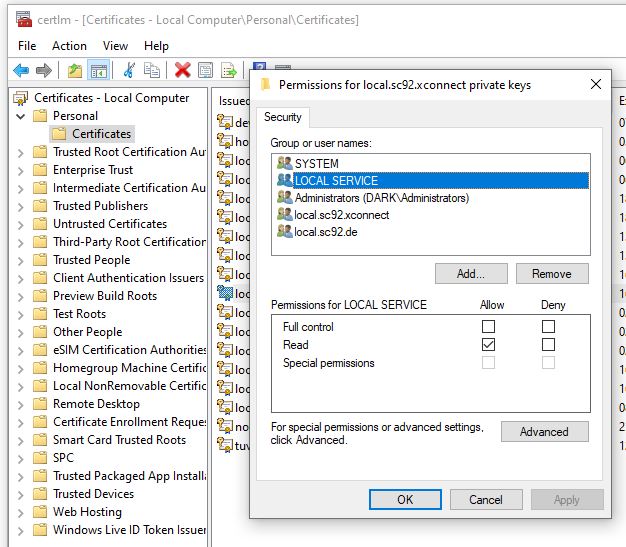
And last but not least, don’t forget to set the read-access on the certificate for your apppools and Local Service.
 Anna's blog